I recently got the slp7135 for my 06 dodge magnum and it didn't work. I spent 3 days on the phone with tech support and they said finally that they thought it was a bad tool. So i sent it back and got a new one. Well same thing..it is not working either. I just spent all day on the phone with tech and they said it was the usb cable. well i went a got a new one and it still won't work.
When i open DsDownloader it finds the tool and then i do the calibration update and it will go all they through to the end and then freezes it seems like. They tool will say to unplug but the computer itself is stuck on the calibration update screen and won't do anything. So then it pops up an error message a little later and says that it wasn't able to send file to tool, make sure firmware is up to date. And it is v.9r03 is what is on it. Then if i take the tool back out to the car and hit performace toon to finish calibration update it gives me the same screen saying this vehicle needs an update calib.:04896568AG.
I am really upset that i can't get this to work and what is even more frustrated is tech support is very confused about it as well. When you spend hours on the phone with someone and they still can't help you it is a total disappointment.
Anyone have any suggestions?!?!
Calibration update won't work!!!!
Moderator: mikel
-
mikel

- Posts: 58726
- Joined: Tue Jan 16, 2007 1:17 pm
- Location: DiabloSport World Headquarters
- Contact:
RE: Calibration update won
Looking into this today still.
Mike Litsch
DiabloSport Brand Manager
Diablo Tech support by phone:
561-908-0040
M-F 8:00 AM to 5:00 PM EST
[email protected]
DiabloSport Brand Manager
Diablo Tech support by phone:
561-908-0040
M-F 8:00 AM to 5:00 PM EST
[email protected]
-
mikel
- Posts: 58726
- Joined: Tue Jan 16, 2007 1:17 pm
- Location: DiabloSport World Headquarters
- Contact:
I'm pretty sure they were mistaken 
Mike Litsch
DiabloSport Brand Manager
Diablo Tech support by phone:
561-908-0040
M-F 8:00 AM to 5:00 PM EST
[email protected]
DiabloSport Brand Manager
Diablo Tech support by phone:
561-908-0040
M-F 8:00 AM to 5:00 PM EST
[email protected]
-
mikel
- Posts: 58726
- Joined: Tue Jan 16, 2007 1:17 pm
- Location: DiabloSport World Headquarters
- Contact:
Hoping to have a fix today.
Mike Litsch
DiabloSport Brand Manager
Diablo Tech support by phone:
561-908-0040
M-F 8:00 AM to 5:00 PM EST
[email protected]
DiabloSport Brand Manager
Diablo Tech support by phone:
561-908-0040
M-F 8:00 AM to 5:00 PM EST
[email protected]
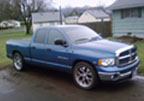
Dude I feel for you. Mopar stuff used to be able to be reset if you disconnect the battery on both posts and hold the positive and negative WIRES together, DON"T touch one of them to the other battery post as a shortcut, you'll blow it up. It should put your ecu back to factory settings, even erasing the program installed in it. You have to hold them together no less than 2 minutes. It has worked on my 2003 Hemi P/U on different occasions, maybe its worth a try on your car. It also resets the adaptive memory.
Volant cold air intake, BBK headers, Magnaflow exhaust, Port/Polish heads, .030 over, 268/272 Comp cam, Beehive valve springs, pushrods, new rebuild on the motr with all of the typical stuff, 75 shot NOS, 3.92 gears, lowered 2.5 front, 4.5 rear, 22 inch Zora rims, full 1200 watt stereo system...
-
mikel
- Posts: 58726
- Joined: Tue Jan 16, 2007 1:17 pm
- Location: DiabloSport World Headquarters
- Contact:
email sent
Mike Litsch
DiabloSport Brand Manager
Diablo Tech support by phone:
561-908-0040
M-F 8:00 AM to 5:00 PM EST
[email protected]
DiabloSport Brand Manager
Diablo Tech support by phone:
561-908-0040
M-F 8:00 AM to 5:00 PM EST
[email protected]
Would this fix the problem I have been encountering:
http://diablosport.com/index.php?name=P ... highlight=
By the way, I just want to say that I have searched the forum for problems and whenever somebody has a similar problem, the last post is always you with "email sent" and then the person says "thank you, it worked!" It would really be helpful if you could post the solution up for when other people have similar problems in the future and it would save them and you a lot of time.
Thank you!
http://diablosport.com/index.php?name=P ... highlight=
By the way, I just want to say that I have searched the forum for problems and whenever somebody has a similar problem, the last post is always you with "email sent" and then the person says "thank you, it worked!" It would really be helpful if you could post the solution up for when other people have similar problems in the future and it would save them and you a lot of time.
Thank you!
-
mikel
- Posts: 58726
- Joined: Tue Jan 16, 2007 1:17 pm
- Location: DiabloSport World Headquarters
- Contact:
well, this one did not end with 'thank you, it worked'....
We have advised the customer to replace the SLP7135 with a U7135 to get around the issue.
Thanks
We have advised the customer to replace the SLP7135 with a U7135 to get around the issue.
Thanks
Mike Litsch
DiabloSport Brand Manager
Diablo Tech support by phone:
561-908-0040
M-F 8:00 AM to 5:00 PM EST
[email protected]
DiabloSport Brand Manager
Diablo Tech support by phone:
561-908-0040
M-F 8:00 AM to 5:00 PM EST
[email protected]